Write once.
Generate everything.
Run anywhere.
One Core API for any model, local or cloud. One Runtime where agents pause, resume and replay. One Gateway on macOS, Linux, Windows or in a container, on your laptop, your network or the internet, with thin clients on every device. Multimodal input & output: text, documents, images, video, voice, music, 3D, camera.
curl -LsSf https://raw.githubusercontent.com/lpalbou/AbstractFramework/main/scripts/install.sh | sh
macOS 13 or later (the Apple Silicon engines need macOS 14), about 5 GB free. Installs in your user account, local voice included, and opens the web console signed in; running it again repairs or upgrades. All install options →
Run the installer
The line above, or the macOS .pkg installer.The line above, in a terminal or over SSH.The PowerShell line above; no administrator rights needed.pip install abstractframework, with [apple] or [gpu] for local engines.
The console opens
In your browser, already signed in.In your browser, signed in; on a headless server the installer offers the terminal console.In your browser, already signed in.Run abstractgateway serve: it prints a one-time sign-in link to the console.
Pick your models
Use recommended defaults for what this Mac can run.Use recommended defaults for what this computer can run.Use recommended defaults for what this computer can run.Open the link, then Use recommended defaults for what this computer can run.
Use it anywhere
Apps at /apps/<app>/, the terminal, or the menu-bar icon.Apps at /apps/<app>/ or the terminal; start at login runs as a systemd --user service.Apps at /apps/<app>/, the terminal, or the icon in the system tray.Apps at /apps/<app>/, or AbstractCore straight from your own Python code.
from abstractcore import create_llm

# Local model on Apple silicon (MLX). Any provider works the same way, e.g.
# create_llm("openai", model="gpt-5-mini") or create_llm("ollama", model="qwen3:4b").
llm = create_llm("mlx", model="mlx-community/Qwen3.5-4B-4bit")

response = llm.generate("In two sentences, what is a durable workflow runtime?")
print(response.content)

# Image, voice and music below use the defaults set once (defaults.sh, or the console's "Use recommended defaults")
image = llm.generate("A watercolor illustration of a lighthouse on a rocky coast at dawn, soft light, calm sea", output="image")
speech = llm.generate("AbstractFramework: write once, generate everything, run anywhere.", output="voice")
music = llm.generate("Calm ambient piano with soft strings, instrumental", output="music")

open("lighthouse.png", "wb").write(image.outputs["image"][0].data)
open("tagline.wav", "wb").write(speech.outputs["voice"][0].data)
open("ambient.wav", "wb").write(music.outputs["music"][0].data)
The image, voice and music calls need their routes set once: the gateway console's Use recommended defaults sets voice and image where this computer runs them; set music with abstractcore config set-default output.music or the console's Multimodal tab. Qwen3.5-4B thinks before it answers: the first text call can take a while; pass thinking="none" for a quick reply. Both forms →
Choose Your Entry Point
Start with the LLM library in your own code, or run the gateway as a control plane with apps on every device. Both use the same packages underneath.
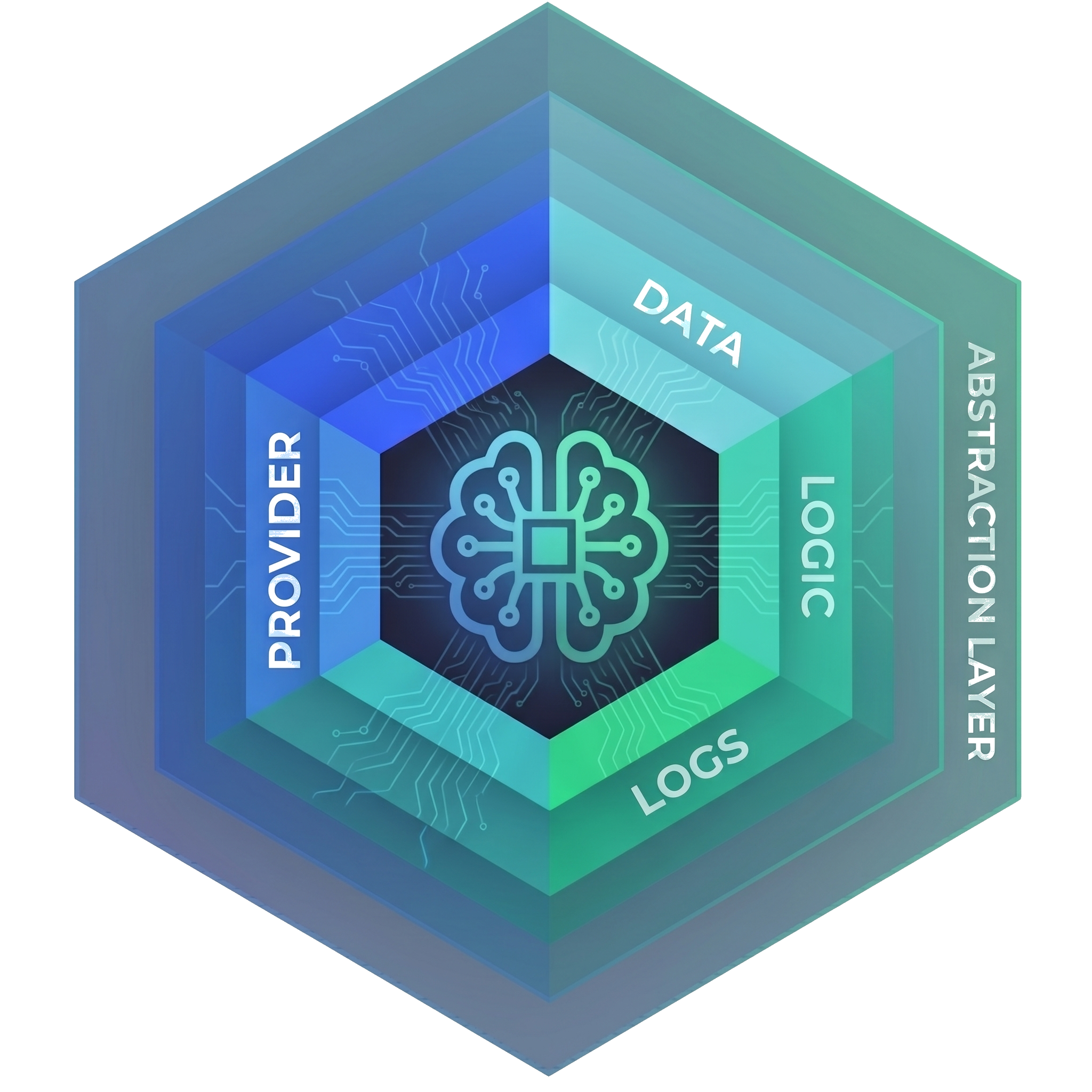
AbstractCore
Start here if you need an LLM library for scripts, notebooks or your own application. No server: install it, pick a provider and a model, and call it. You choose the provider and model for each capability explicitly, per call, or once as a default.
- 10 provider types behind one API, local and cloud
- Tool calling, structured output, streaming, media input
- Capability plugins: voice, music, vision, 3D, camera
- An OpenAI-compatible
/v1server, a web console andabstractcore-console - Model recommendations for this machine before you download
pip install abstractcore            # light: OpenAI, Anthropic, OpenRouter, Portkey, LM Studio, Ollama, vLLM, any OpenAI-compatible endpoint
pip install "abstractcore[apple]"   # light + local MLX engines on Apple silicon
pip install "abstractcore[gpu]"     # light + local vLLM on NVIDIA / AMD GPUs
When to use AbstractCore
You are writing a script, a notebook or a tool. You want to talk to models with minimal setup and switch between local runtimes and cloud APIs without rewriting your code. You do not need persistent runs or a server.
AbstractGateway
Start here for agents that run for hours, workflows that survive restarts, automations, and several clients on several devices. The gateway is the control plane on the durable runtime. Its console's first-run guide and Use recommended defaults set the models for text, voice, images and video where this computer can run them.
- Durable runs that survive restarts, with an append-only ledger
- Automations: recurring or on-demand runs kept as conversations
- Web and terminal consoles, user accounts, network access
- Thin clients in a terminal, a browser and the tray (the menu bar on macOS); Telegram and email bridges
- Start on one device, continue on another
pip install abstractgateway
# or
docker pull ghcr.io/lpalbou/abstractgateway:0.7.2
When to use AbstractGateway
You are building a product or running AI for yourself or a team: a coding agent, recurring reports, a chat that follows you across devices. You want runs that survive crashes, user accounts, and clients that are views of the same run.
# Start once. Connect from anywhere.
abstractgateway serve
# prints http://127.0.0.1:8080/console#claim=... (one-time sign-in link)

# Browser apps, served by the gateway itself
http://127.0.0.1:8080/apps/code/
http://127.0.0.1:8080/apps/observer/

# Terminal client, signed in to a remote gateway
abstractcode login --gateway-url https://gateway.example.com --token <TOKEN>One call for every modality
llm = create_llm(provider, model=...)
llm.generate(prompt, media=[...], output=...)
Inputs go in media=, the output modality in output=; a provider is required. With defaults configured once, output="image" is enough; without them, name the engine in output={...}.
- Set the routes once per machine; the gateway console's Use recommended defaults and its Multimodal tab write the same AbstractCore store (recommended defaults set voice and image; set music as shown). Then each modality is one line, and the picture goes back in through
media=.
# Once per machine (the gateway console's "Use recommended defaults" writes the same store)
abstractcore config set-default output.image --provider mlx-gen --model AbstractFramework/flux.2-klein-4b-8bit
abstractcore config set-default output.voice --provider supertonic --model supertonic-3
abstractcore config set-default output.music --provider acestep --model ACE-Step/acestep-v15-xl-turbo-diffusers
# Defaults set once: see defaults.sh (or the gateway console's "Use recommended defaults")
from abstractcore import create_llm
llm = create_llm("mlx", model="mlx-community/Qwen3.5-4B-4bit")
image = llm.generate("A watercolor illustration of a lighthouse on a rocky coast at dawn, soft light, calm sea", output="image")
speech = llm.generate("AbstractFramework: write once, generate everything, run anywhere.", output="voice")
music = llm.generate("Calm ambient piano with soft strings, instrumental", output="music")
open("lighthouse.png", "wb").write(image.outputs["image"][0].data)
open("tagline.wav", "wb").write(speech.outputs["voice"][0].data)
open("ambient.wav", "wb").write(music.outputs["music"][0].data)
# Ask the text model about the picture it just made (the image goes in through media=)
answer = llm.generate("What is in this picture?", media=["lighthouse.png"])
print(answer.content)The model answered: “This picture depicts a serene, watercolor-style illustration of a lighthouse situated on a rocky outcrop. …”
- No configured defaults and no server: each output names its engine. This ran with
pip install "abstractframework[apple]"0.6.2, with every route cleared first.
from abstractcore import create_llm

# generate() is a method on an LLM instance: the text model is the entry point; each output below names its own engine
llm = create_llm("mlx", model="mlx-community/Qwen3.5-4B-4bit")

image = llm.generate("A watercolor illustration of a lighthouse on a rocky coast at dawn, soft light, calm sea",
                     output={"modality": "image", "provider": "mlx-gen", "model": "AbstractFramework/flux.2-klein-4b-8bit"})
speech = llm.generate("AbstractFramework: write once, generate everything, run anywhere.",
                      output={"modality": "voice", "provider": "supertonic", "model": "supertonic-3"})
music = llm.generate("Calm ambient piano with soft strings, instrumental",
                     output={"modality": "music", "provider": "acestep", "model": "ACE-Step/acestep-v15-xl-turbo-diffusers"})

open("lighthouse.png", "wb").write(image.outputs["image"][0].data)
open("tagline.wav", "wb").write(speech.outputs["voice"][0].data)
open("ambient.wav", "wb").write(music.outputs["music"][0].data)

# Ask the text model about the picture it just made (the image goes in through media=)
answer = llm.generate("What is in this picture?", media=["lighthouse.png"])
print(answer.content)
The model answered: “This picture depicts a serene watercolor painting of a lighthouse. …”
- Any OpenAI client, in any language, against
abstractcore serve. Paste the token thatabstractcore serve --print-tokenprints in place of<token>; the server asks for it even on loopback. The picture goes back to the chat endpoint as a base64 data URL.
# <token>: printed by abstractcore serve --print-token
# Start the server first (another terminal): abstractcore serve --port 19740

curl -sS http://127.0.0.1:19740/v1/audio/speech -H "Authorization: Bearer <token>" \
  -H "Content-Type: application/json" \
  -d '{"provider": "supertonic", "model": "supertonic-3",
       "input": "AbstractFramework: write once, generate everything, run anywhere.", "response_format": "wav"}' \
  --output tagline.wav

curl -sS http://127.0.0.1:19740/v1/audio/music -H "Authorization: Bearer <token>" \
  -H "Content-Type: application/json" \
  -d '{"provider": "acestep", "model": "ACE-Step/acestep-v15-xl-turbo-diffusers",
       "prompt": "Calm ambient piano with soft strings, instrumental", "response_format": "wav"}' \
  --output ambient.wav

curl -sS http://127.0.0.1:19740/v1/images/generations -H "Authorization: Bearer <token>" \
  -H "Content-Type: application/json" \
  -d '{"provider": "mlx-gen", "model": "AbstractFramework/flux.2-klein-4b-8bit",
       "prompt": "A watercolor illustration of a lighthouse on a rocky coast at dawn, soft light, calm sea",
       "width": 1024, "height": 1024, "response_format": "b64_json"}' > image.json

# Save the generated picture, then ask the chat model about it: the PNG travels as a base64 data URL
python3 -c 'import base64,json; open("lighthouse.png","wb").write(base64.b64decode(json.load(open("image.json"))["data"][0]["b64_json"]))'
IMG=$(base64 < lighthouse.png | tr -d '\n')
cat > question.json <<JSON
{"model": "mlx/mlx-community/Qwen3.5-4B-4bit", "reasoning_effort": "none",
 "messages": [{"role": "user", "content": [
   {"type": "text", "text": "What is in this picture?"},
   {"type": "image_url", "image_url": {"url": "data:image/png;base64,$IMG"}}]}]}
JSON
curl -sS http://127.0.0.1:19740/v1/chat/completions -H "Authorization: Bearer <token>" \
  -H "Content-Type: application/json" -d @question.json
The model answered: “This is a watercolor painting of a lighthouse situated on a rocky coastal cliff, overlooking the sea. …”
What “Python (with defaults)” produced
AbstractFramework: write once, generate everything, run anywhere.
Calm ambient piano with soft strings, instrumental

A watercolor illustration of a lighthouse on a rocky coast at dawn, soft light, calm sea
One Interface for Every Modality
Text, images, audio, video and documents in; text, voice, music, images, video and 3D out, through the same generate() on the same LLM instance. Each modality is a capability plugin: install it and AbstractCore picks it up.
media=Text
Any of ten provider types, local or cloud, with tools and structured output.
Images
A vision model, or a vision fallback that describes the image for a text-only model.
Audio
Speech through AbstractVoice or an audio-capable model; sound and music understanding through audio-capable models (no dedicated local engine).
Video
Native video where the model supports it, otherwise sampled frames.
Documents
PDFs and Office files, with optional visual-text compression for long ones.
llm.generate()
one call, one policy for media,local and cloud models
output=Text AbstractCore
Streaming, tool calls and structured output, the same across providers.
Voice AbstractVoice
Text-to-speech, speech-to-text and voice cloning, local or remote.
Music AbstractMusic
Text-to-music: ACE-Step and Stable Audio locally, ACE Music and ElevenLabs remotely.
Vision: images and video AbstractVision
Generate, edit and upscale images; text-to-video and image-to-video.
3D Abstract3D
Image-to-3D and text-to-3D, with GLB output.
- Textin & out
- Documentsin
- Imagesin & out
- Videoin & out
- Voicein & out
- Musicout; understanding in via audio models
- 3Dout
- Camerain (capture)
Music: generated through AbstractMusic; music understanding comes in through audio-capable models (no dedicated engine); a dedicated music input is planned.
Media input follows explicit policies, never silent changes. AbstractCamera is a capability too, for capture rather than generation: it opens real cameras, takes photos and clips, and gives an agent camera tools. The one-line output="image" form needs a default route for that capability; without one, name the provider and model in the call: the tabs in One call for every modality show it in Python with defaults, over HTTP, without defaults, and with media input.
The code for each modality, in Python and over HTTP, and what it produced →
A Durable Orchestration Stack, in Three Layers
Most agent libraries orchestrate inside your process. AbstractFramework adds durable runs, a replay-first ledger and a control plane with clients. Use one layer or all three.
One API for every model and modality
AbstractCore in your Python code: ten provider types, tools, structured output, media input, and capability plugins for voice, music, images and video, 3D and cameras.
Agents that pause, resume and replay
AbstractRuntime runs agents and workflows as durable runs: every step, effect and wait goes to an append-only ledger. Agent patterns, memory, semantics, skills and portable .flow bundles build on it.
A gateway and thin clients
AbstractGateway starts, resumes and cancels runs, schedules automations, manages users and network access, and serves the consoles and apps. Every client replays the same runs.
vs direct provider SDKs
Fine when you use one provider and need no durable orchestration. AbstractCore adds provider portability between local and cloud, consistent tool and structured-output behavior across backends, media policies and capability plugins.
vs LangChain, LlamaIndex, PydanticAI
AbstractFramework is stronger on durability and pause/resume as primitives, replay-first observability and portable .flow bundles. Those libraries have larger connector and RAG ecosystems; you can use them as tools inside AbstractFramework.
vs Temporal, job schedulers
AbstractGateway is architecturally closer to these, specialised for LLM and tool loops: tool-approval waits, AI artifacts, and thin clients that replay runs over HTTP and SSE.
Modular by Design
Every package is independently installable. Hover or focus each block to explore; click it to open its page. Use one or compose the full stack.
| Layer | Packages |
|---|---|
| Applications | AbstractFlow, AbstractCode, AbstractObserver, AbstractAssistant, AbstractContinuum, AbstractEntity |
| Control plane | AbstractGateway (web console, abstractgateway-console) |
| Durable runtime | AbstractRuntime, AbstractAgent, AbstractMemory, AbstractSemantics, AbstractSkill |
| Library | AbstractCore, AbstractVoice, AbstractMusic, AbstractVision, Abstract3D, AbstractCamera |
| Toolkits | AbstractTUI, AbstractUIC, MLX-Gen |
Agentic operations run on the runtime
AbstractRuntime executes every agent and workflow as a durable run. Each step, effect, wait and error is appended to the run's ledger, so a run survives restarts and can be replayed.
The gateway is the controller
AbstractGateway starts, resumes and cancels runs, keeps durable schedules for automations, owns users, auth and the Network setting, and serves the consoles and the browser apps.
The apps are thin clients
A client holds no durable state: it rebuilds its view by replaying the ledger, then follows new events over SSE. Several apps on several devices are live views of the same run.
Also on PyPI, reserved with no runtime yet: abstractsound, abstractvideo, abstractspatial, abstractgeometry, abstractcognition.
The Ledger Is the Record of the Run
Most stacks log what an agent did. Here every step is appended to the run's ledger as it happens, and everything you see about a run is read back from it.
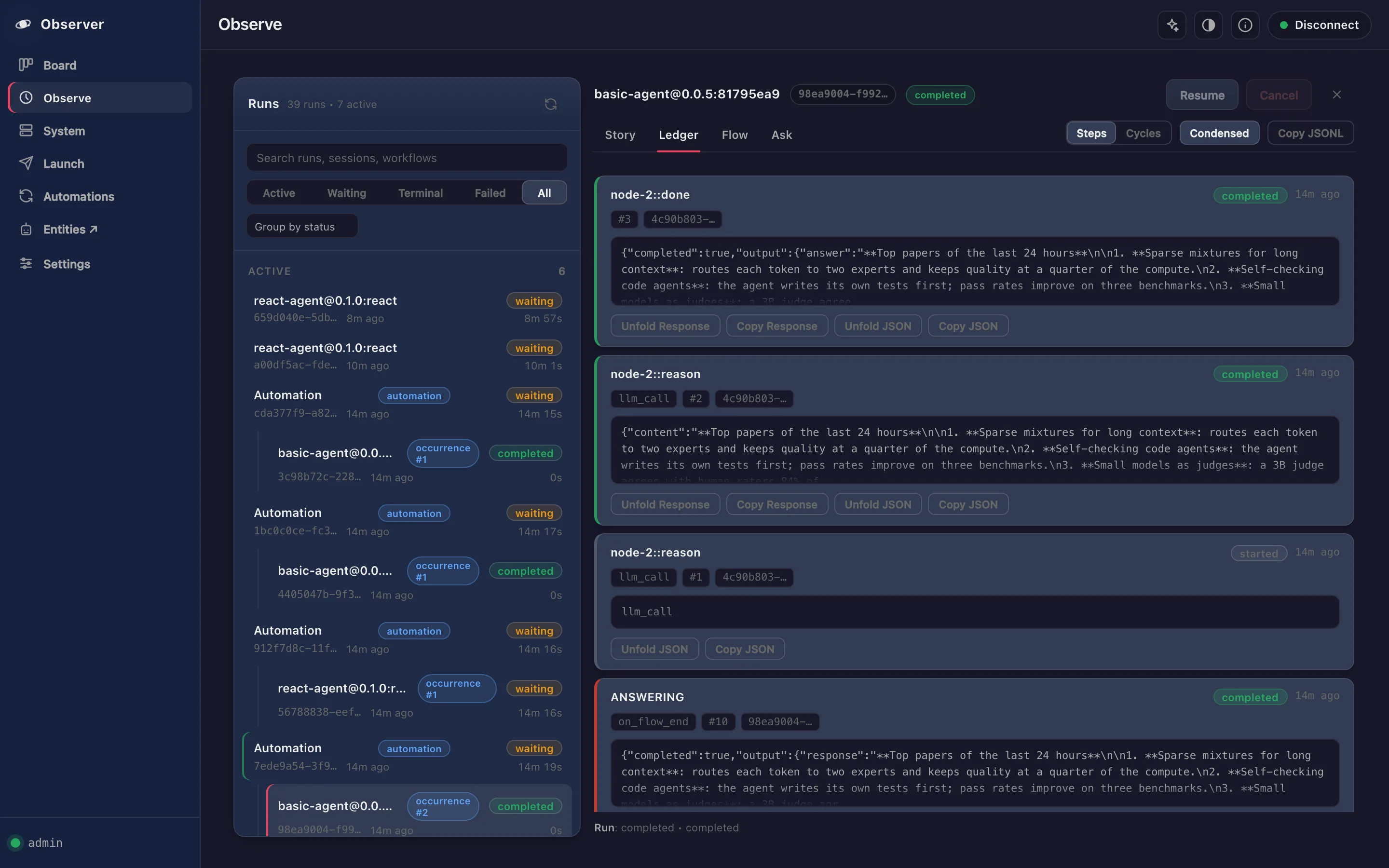
Every step, effect, wait and result of a run is appended to its ledger as it happens: the node, what it asked for with its full payload, what came back, when and by whom. Its state is checkpointed at every step, on the gateway, not in any app.
Nothing summarised away
Prompts, model replies, tool calls and their results, waits and approvals are all records. The chat transcript, the tool activity and the Observer's trace are views of the same ledger.
Survives a crash or a restart
A record is written before the checkpoint that commits it. After a restart the run resumes from its checkpoint, and effects that already completed are never run twice.
Thin apps replay it, from any device
AbstractCode (terminal and browser), the Assistant, the Observer and your own app load the run's history from the gateway and follow new records live over SSE. The apps hold no state of their own, so several devices are live views of one run, and a client that reconnects catches up from its last cursor.
- 01llm_callreason · model requeststarted
- 02llm_callreason · reply with one tool callcompleted
- 03tool_callsact · payload: tool and argumentsstarted
- 04tool_callsact · waiting for your approvalwaiting
- 05tool_callsact · approved, tool resultcompleted
- 06llm_callreason · model request with the resultstarted
- 07llm_callreason · final answercompleted
# <token>: <data dir>/auth/bootstrap-admin-token, or the console's one-time link (abstractgateway docs/configuration.md:120, v0.7.2)

# Start a run of a shipped workflow (flow_id omitted: the bundle's default entrypoint)
RUN_ID=$(curl -sS -H "Authorization: Bearer <token>" -H "Content-Type: application/json" \
  -d '{"bundle_id":"basic-agent","input_data":{"prompt":"How long should I steep green tea?"}}' \
  "http://127.0.0.1:8080/api/gateway/runs/start" | python3 -c 'import json,sys; print(json.load(sys.stdin)["run_id"])')

# Replay the ledger, then follow new records live (SSE; --max-time ends the sample)
curl -sS -H "Authorization: Bearer <token>" "http://127.0.0.1:8080/api/gateway/runs/$RUN_ID/ledger?after=0"
curl -sS -N --max-time 5 -H "Authorization: Bearer <token>" "http://127.0.0.1:8080/api/gateway/runs/$RUN_ID/ledger/stream"

# The run and its ledger survive a gateway restart
curl -sS -H "Authorization: Bearer <token>" "http://127.0.0.1:8080/api/gateway/runs/$RUN_ID"For the Apps, the Ledger Is the Run
For the apps, the ledger is the run: they hold no state of their own; they load the run's history from the gateway and follow it live. The Observer's Ledger tab shows each record with its JSON payload.
Design on your laptop. Deploy anywhere. Same framework.
The same gateway runs on this computer, a server on your network, a container or the internet. You choose who can reach it; the install profile decides which local engines it carries. Local and cloud models mix freely.
Who can reach it
This computer
The default: the gateway listens on 127.0.0.1 only, with user accounts on. Nobody else can connect.
localhostDefaultLocal network (LAN)
Every device on your network (or your VPN) reaches the sign-in page and the API. User accounts are required. It is plain HTTP, so use it on networks you trust, or behind a TLS proxy or VPN.
lanAccounts requiredInternet
The same, with an explicit acknowledgement. The gateway does not terminate TLS: put your own TLS reverse proxy (Caddy, nginx, Traefik) or a tunnel in front of it.
internetYour TLSHow it runs
Desktop
An icon in the macOS menu bar, the Windows system tray or a Linux panel opens the console already signed in. Start AbstractGateway at login registers a per-user login item.
Headless server
Install over SSH with the same one-line installer, manage it from the terminal console (abstractgateway-console), keep it running with a systemd --user service, and reach the console, the API and every app through one SSH tunnel.
systemd --userContainer
Release images on GHCR (ghcr.io/lpalbou/abstractgateway, and a -gpu variant), run with a mounted data directory and ABSTRACTGATEWAY_USER_AUTH=1.
In practice. A new gateway answers on this computer only. The Network setting, in the web console, the terminal console or the tray, or abstractgateway network set lan (or internet) opens it up at the next start, and both keep user accounts on. A gateway started on another address without user accounts or a token refuses to start.
What it carries
Light
Remote inference: OpenAI, Anthropic, OpenRouter, Portkey, LM Studio, Ollama, vLLM and any OpenAI-compatible endpoint. Runs anywhere Python runs.
Apple
Everything in Light, plus the local MLX and Metal engines on Apple Silicon (macOS 14 or later) for text, voice, images and video.
GPU
Everything in Light, plus the local engines for NVIDIA CUDA or AMD ROCm on Linux, and Windows where the wheels exist.
# From your computer: one tunnel for the console, the API and every app
ssh -L 8080:127.0.0.1:8080 <server>
# then open http://127.0.0.1:8080/consoleEvery Component, Layer by Layer
From the library to the applications: 21 components, published as 24 main packages on PyPI, npm and crates.io, grouped by the layer they belong to. AbstractCore and its plugins work on their own; each higher layer builds on the ones below. Versions are the released ones; AbstractCamera installs separately.
Library
AbstractCore and its capability plugins, in your own Python code
Foundation
AbstractCore 2.19.0
The Core API over ten provider types: OpenAI, Anthropic, OpenRouter, Portkey, Ollama, LM Studio, MLX, Hugging Face, vLLM and any OpenAI-compatible endpoint. Tools, structured output, streaming, media input, embeddings, capability plugins and an OpenAI-compatible server.
- Web console:
abstractcore serve, then the printed/consolelink - Terminal console:
abstractcore-console(crates.io, 0.4.1)
AbstractVoice 0.13.0
Text-to-speech, speech-to-text and voice cloning: Supertonic, Piper, Qwen3-TTS, OmniVoice, Whisper and more locally, OpenAI and OpenAI-compatible voice remotely.
AbstractMusic 0.1.15
Text-to-music and text-to-audio: ACE-Step and Stable Audio locally, ACE Music and ElevenLabs remotely.
AbstractVision 0.3.31
Image generation, editing and upscaling, text-to-video and image-to-video through MLX-Gen on Apple Silicon, Diffusers, stable-diffusion.cpp or OpenAI-compatible services.
Abstract3D 0.3.1
Image-to-3D and text-to-3D with a validated local TripoSR backend and GLB output, mesh operations and AI tools; other local backends are experimental. Part of the framework install since 0.6.2 (AbstractCore installs it).
AbstractCamera 0.2.0
Camera control for tethered bodies, webcams and DWARF smart telescopes behind one manager, with camera tools an agent can call. Installs separately: pip install abstractcamera.
Durable runtime
Where agents and workflows run, remember and use skills
AbstractRuntime 0.7.1
The durable kernel where agents and workflows run: effects and waits, checkpoint and resume, an append-only ledger, and a history window of whole messages up to 50,000 tokens.
AbstractAgent 0.3.17
Agent patterns: ReAct, CodeAct and MemAct loops, run durably by AbstractRuntime, with tool approval and full observability of every cycle.
AbstractSkill 0.3.0
Agent Skills (SKILL.md): parsing and validation, the curated skill shelf the gateway seeds, and the trust gate applied before a skill reaches a run.
AbstractMemory 0.3.0
Durable, append-only agent memory: temporal, provenance-aware triples, and a memory system that forms, recalls and consolidates records from use.
AbstractSemantics 0.0.5
The shared vocabulary: predicates, entity types and memory relations in one editable registry, with a bounded JSON Schema builder for knowledge-graph output.
Control plane
One gateway that starts, resumes and schedules runs and serves every client
Control Plane
AbstractGateway 0.7.2
The control plane: durable runs over HTTP and SSE, automations, users and auth, the Network setting, and the browser apps on one address. SQLite or Postgres.
- Web console at
/console: setup, models that fit this machine, engines, network, users - Terminal console:
abstractgateway-console(crates.io, 0.11.1), the same setup over SSH
Applications
Thin clients of the gateway: they replay and follow the same runs
AbstractFlow 0.4.0
The visual workflow editor: draw a graph that mixes agent steps with deterministic nodes. On publish, the gateway installs it as a versioned .flow bundle that runs on AbstractRuntime; the Observer and the API start any published workflow, and agent clients run the ones that declare their interface.
AbstractCode 0.7.1 / 0.6.1
A coding agent that runs durably on the gateway, with a terminal client (0.7.1) and a browser client (0.6.1): tool approvals, workspace files, steering and automations.
AbstractObserver 0.2.1
Watch runs live, replay the ledger step by step, and create and manage automations, in the browser.
AbstractAssistant 0.9.1
A desktop assistant in your menu bar or system tray: a chat palette one click away, hands-free voice conversations and a small CLI, on your gateway's sessions and workflows. The same app runs on macOS, Linux and Windows; on macOS it is also packaged as a menu-bar app bundle.
AbstractContinuum 0.4.0
A board-first console for continuous development and deployment work, served by the gateway.
AbstractEntity 0.3.0
Talk with persistent entities, read their diaries and see how their memory grows, served by the gateway.
Toolkits
The toolkits the framework's own apps are built from, published for yours
AbstractTUI 0.6.0
The Rust terminal UI engine behind AbstractCode's terminal client and the AbstractGateway and AbstractCore terminal consoles: reactive signals, a compositor, a streaming chat feed, Markdown, 26 themes, images and 3D in the terminal. Reuse it for your own terminal apps.
- AbstractCode terminal client:
abstracttui0.6.0 abstractgateway-consoleandabstractcore-console:abstracttui0.3.6
AbstractUIC ui-kit 0.1.16
The web UI kit of the framework's browser apps: React components (chat panel, provider and model pickers, gateway sign-in, About dialog), Web Components, 21 themes and a Node.js gateway session proxy. The gateway web console embeds its components as islands. Reuse it for your own web apps on a gateway.
Draw a Multi-Agent System. Then Use It.
Draw agents, deterministic Python code, branches, loops and parallel steps in one graph. Publish it and your gateway keeps it as a versioned bundle you run like an endpoint: pick it as the agent of a chat in AbstractCode or AbstractAssistant, launch it once from AbstractObserver, schedule it as an automation, or start it from any program with POST /api/gateway/runs/start.
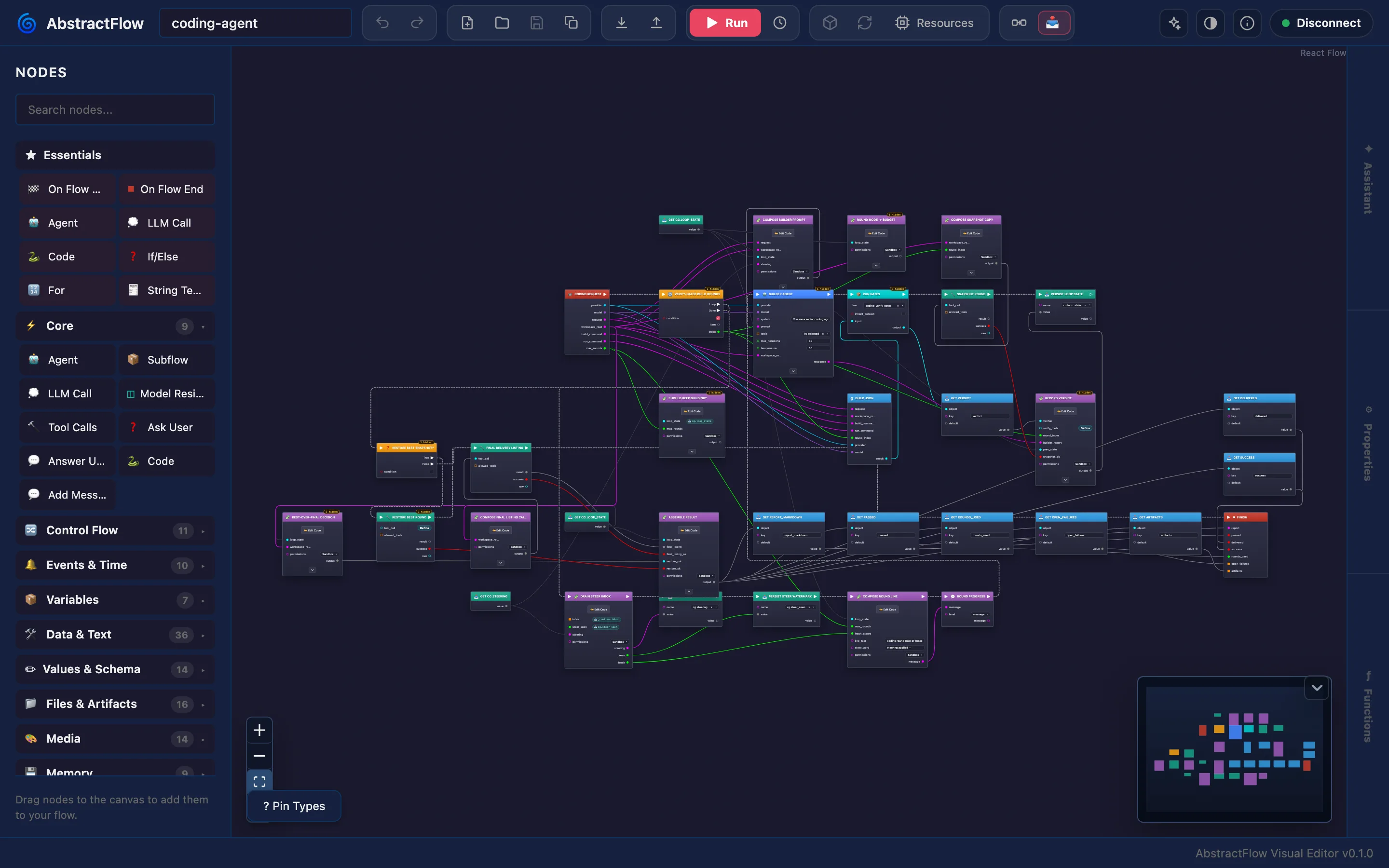
Loop engineering, graph engineering
The loop, the reviewer and the deterministic checks are nodes you can see. Change one, publish again, and the next run uses it.
- Agent, LLM Call, Tool Calls and Subflow nodes next to sandboxed Python Code
- If/Else, Switch, ForEach, For, While, Parallel and Sequence
- Ask User pauses the run until a person answers
- Voice, music, image, video and camera nodes on the gateway's capabilities
1. Draw
Build the graph in the browser. Declare the interface it implements, such as abstractcode.agent.v1, so agent clients know how to call it.
2. Publish
Publish packs a new .flow bundle version and installs it on the gateway. Earlier versions stay available.
3. Drive a chat with it
Declare abstractcode.agent.v1 and it appears under /workflow in the AbstractCode terminal and in the Workflow list of AbstractCode web. Every turn of that chat is a run of your workflow on the same session, and you can switch workflow between turns. The Assistant lists the gateway's shared catalog.
4. Make it the default agent
An admin sets it as the gateway's default for an interface (Workflows → Make agent default). Every chat that follows Gateway default runs it from its next turn.
5. Share it
Export one version as a single .flow file (Export in the console's Workflows tab, or e in the terminal console). An admin installs it on another gateway with Import… (i), then promotes it to that gateway's shared catalog, from the API today, so its users can pick it.
GET /api/gateway/bundles/{id}/download · POST /api/gateway/bundles/upload · POST /api/gateway/admin/workflow-catalog/promote
Made to be shared · Workflows are made to be shared between gateways and the people who use them.
Download one version as a single .flow file, exactly as it runs.
An admin imports the file on another gateway, and it runs there the same way.
Users of that gateway can then pick it: the Assistant and AbstractCode web list the shared catalog.
Start a published workflow
# <token>: <data dir>/auth/bootstrap-admin-token, or the console's one-time link (abstractgateway docs/configuration.md:120, v0.7.2)

# Start a run of a shipped workflow (flow_id omitted: the bundle's default entrypoint)
RUN_ID=$(curl -sS -H "Authorization: Bearer <token>" -H "Content-Type: application/json" \
  -d '{"bundle_id":"basic-agent","input_data":{"prompt":"How long should I steep green tea?"}}' \
  "http://127.0.0.1:8080/api/gateway/runs/start" | python3 -c 'import json,sys; print(json.load(sys.stdin)["run_id"])')
Or whatever the gateway's default agent is
curl -sS -H "Authorization: Bearer <token>" -H "Content-Type: application/json" \
  -d '{"flow_id":"@default","interface":"abstractcode.agent.v1","input_data":{"prompt":"Hello"}}' \
  "http://127.0.0.1:8080/api/gateway/runs/start"
The next step after skills. A skill (SKILL.md) tells an agent in prose what to do; a workflow says it formally and visually, orchestrating model calls, agents and code in one graph that runs durably. Share it as one .flow file: download a version from one gateway (GET /api/gateway/bundles/{bundle_id}/download), install it on another (POST /api/gateway/bundles/upload), or promote it to your gateway's shared catalog.
The answer names the run and the exact workflow version that runs it; the run's ledger then streams every step.
AbstractCode — Terminal and Web
A coding agent that runs durably on the gateway, with two interchangeable clients. Start a task in the terminal, close your laptop, and pick the same session up in the browser: tool approvals, workspace files and streamed replies in both.
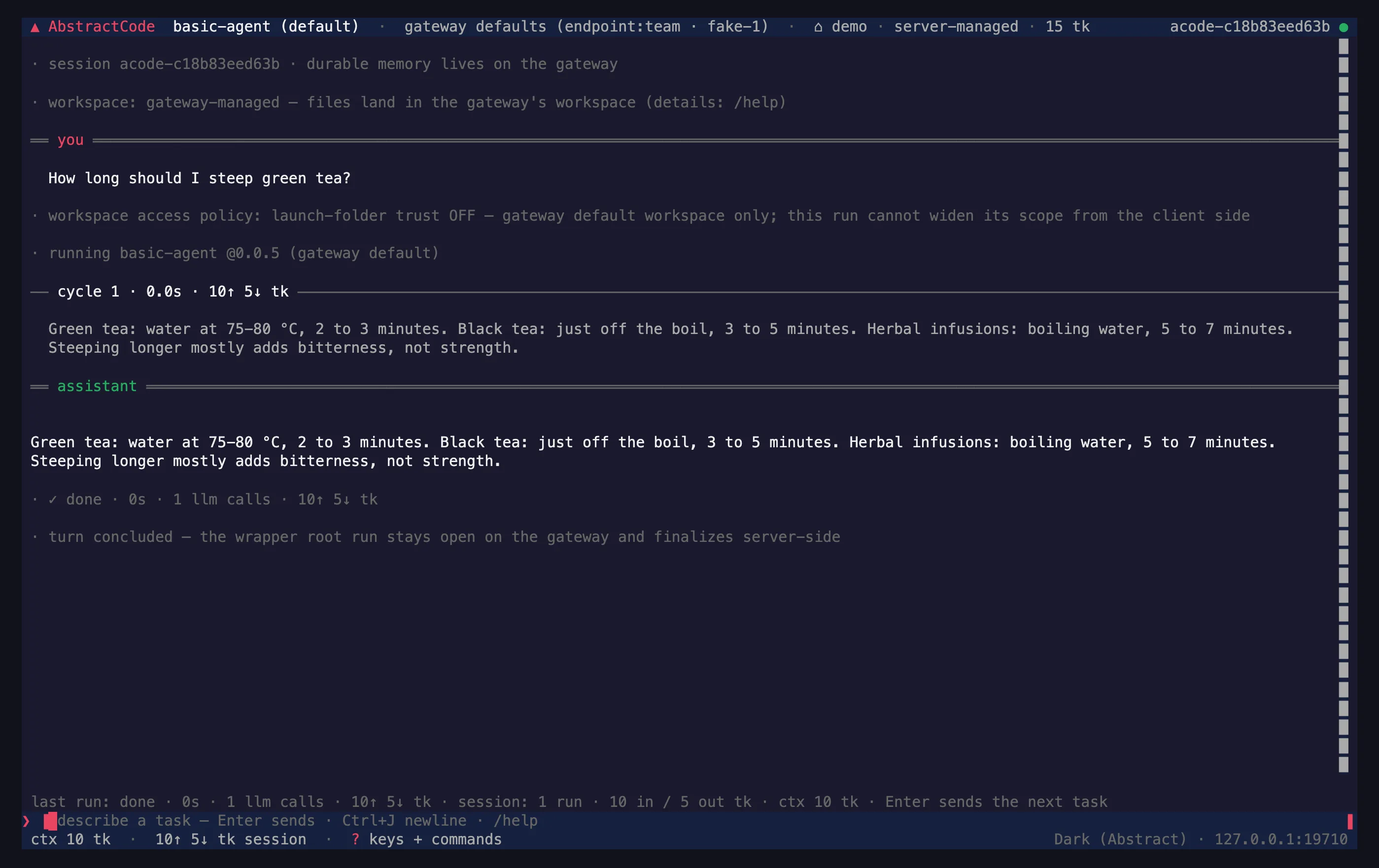
abstractcode 0.7.1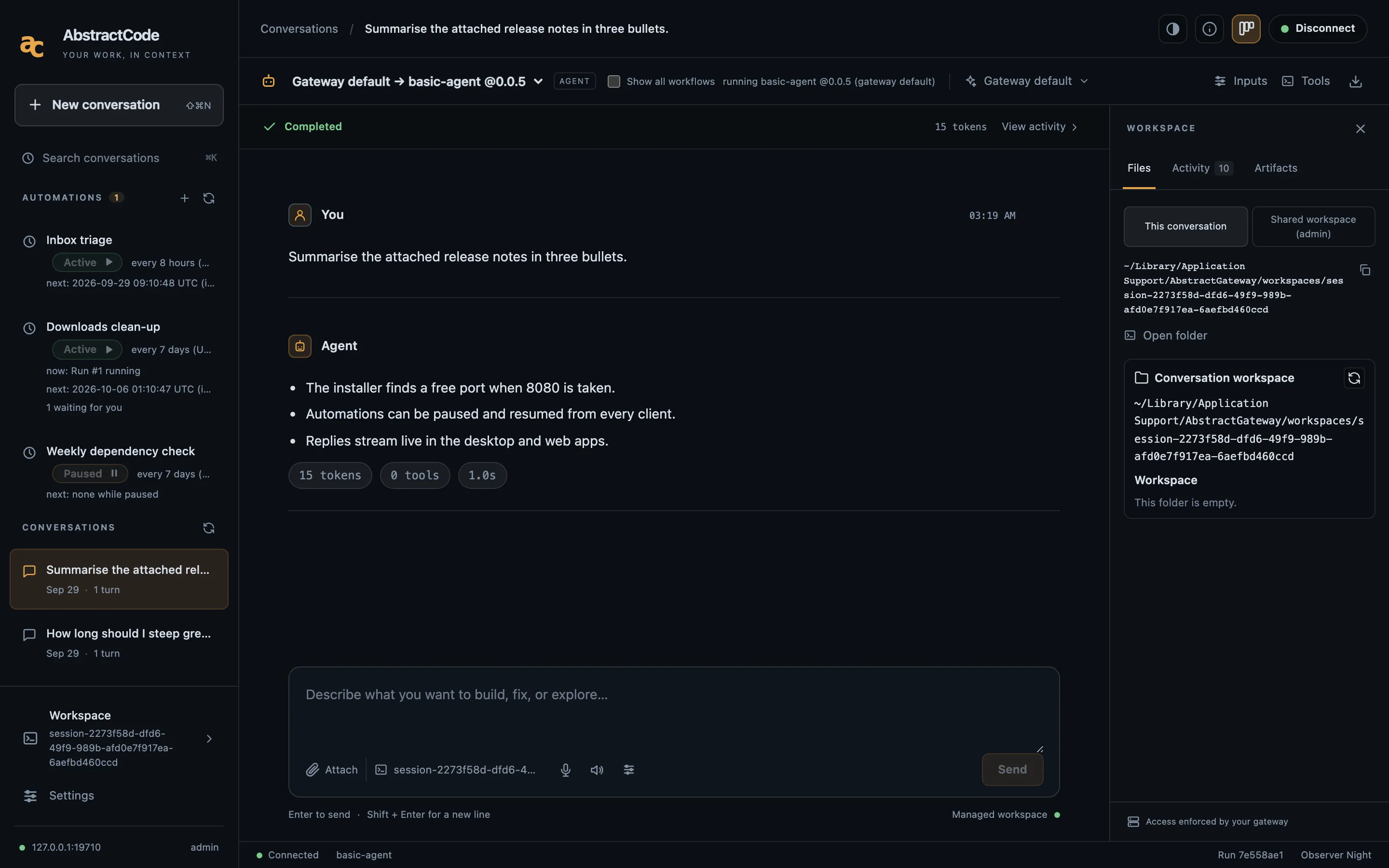
/apps/code/, 0.6.1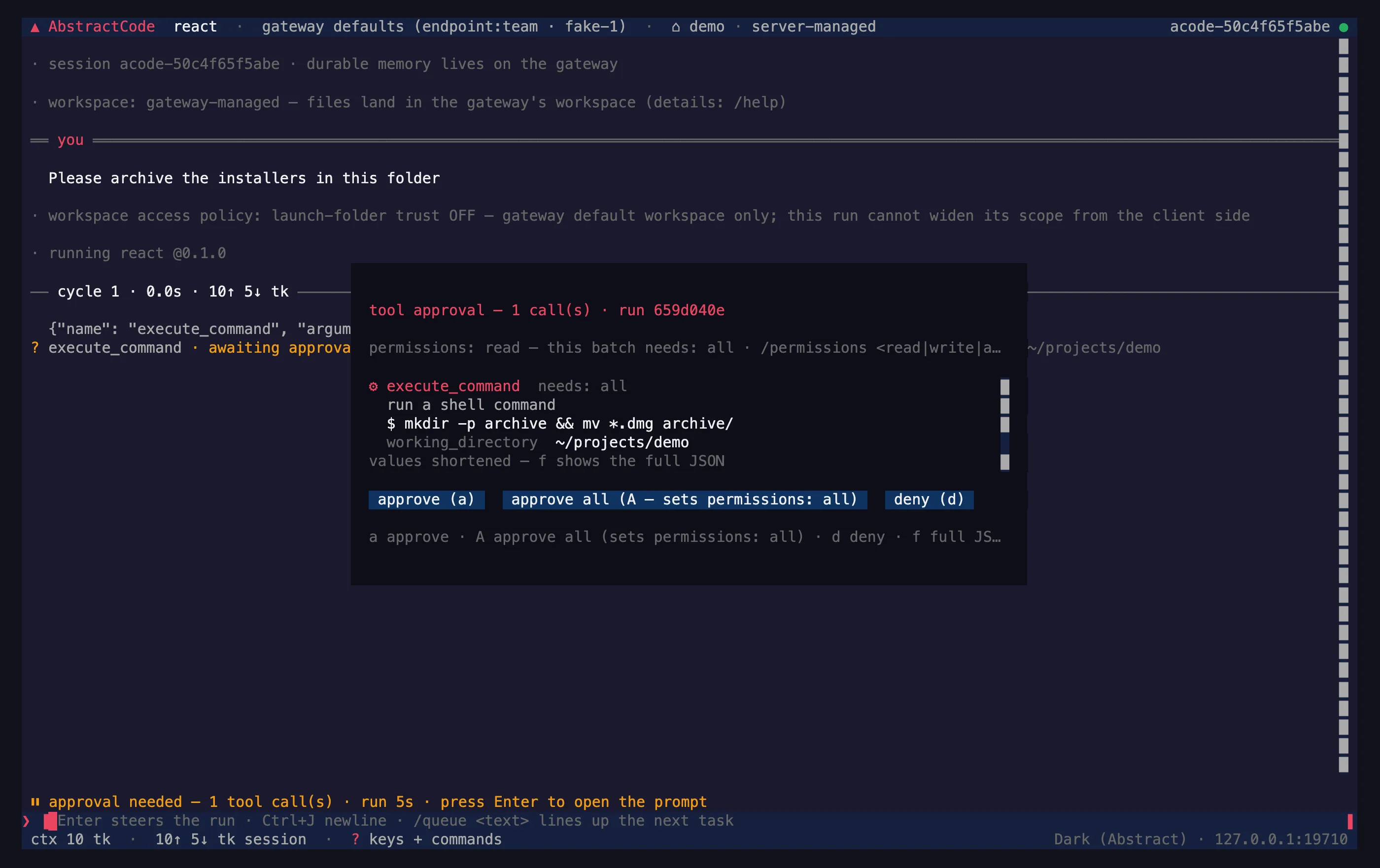
One Session, Two Clients
The terminal client and the browser client are views of the same durable session on the gateway. A tool waits for your approval before it runs.
- Approve once, approve all, or deny
- Workspace files, steering and streamed replies
- Automations from the same session
Agents on a Schedule, With You in the Loop
Create and manage automations in AbstractObserver, the Assistant, Flow or AbstractCode: recurring runs kept as conversations, notifications only when a run needs you.
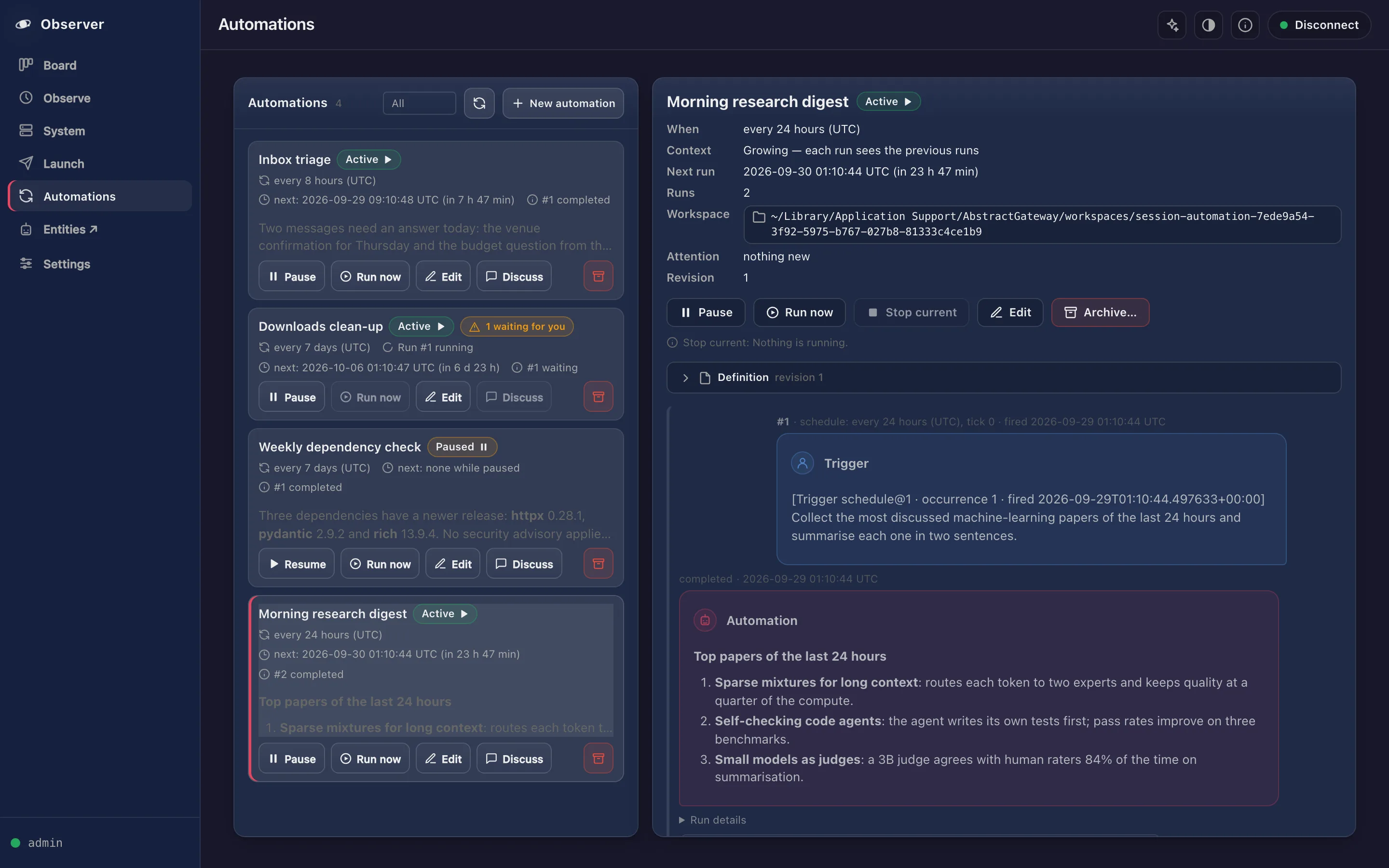
Every Run, a Readable Conversation
An automation runs a workflow or the gateway's default agent at a fixed interval or on demand. Every run is kept as a readable conversation, and you hear about it only when it needs you.
- Independent context, or growing context that builds on earlier runs
- Pause, resume, run now, edit and archive
- Discuss a result: a new chat forked from that run
- Notified only on
notify, a final failure or a run waiting for you
AbstractAssistant — One Click Away
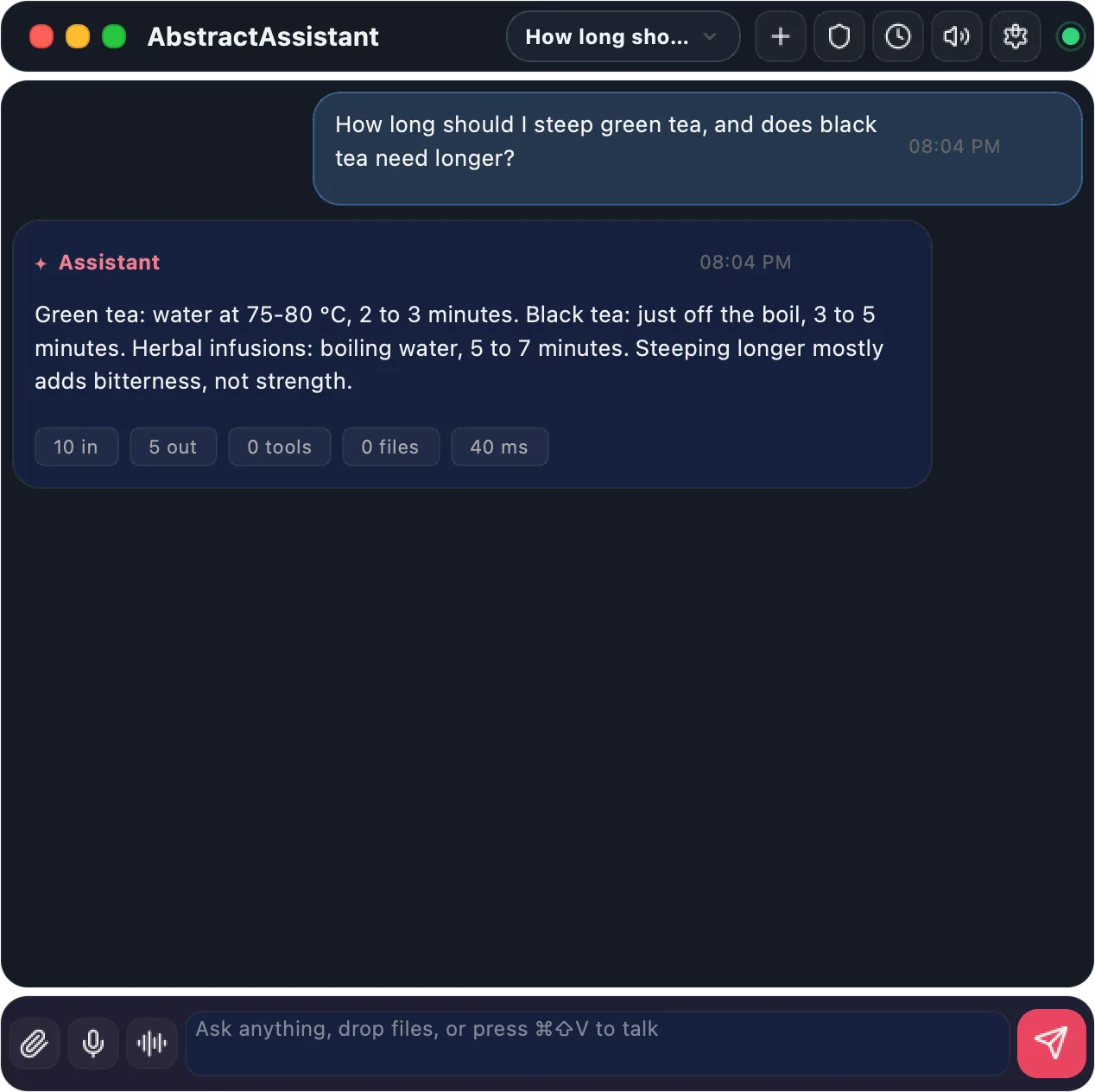
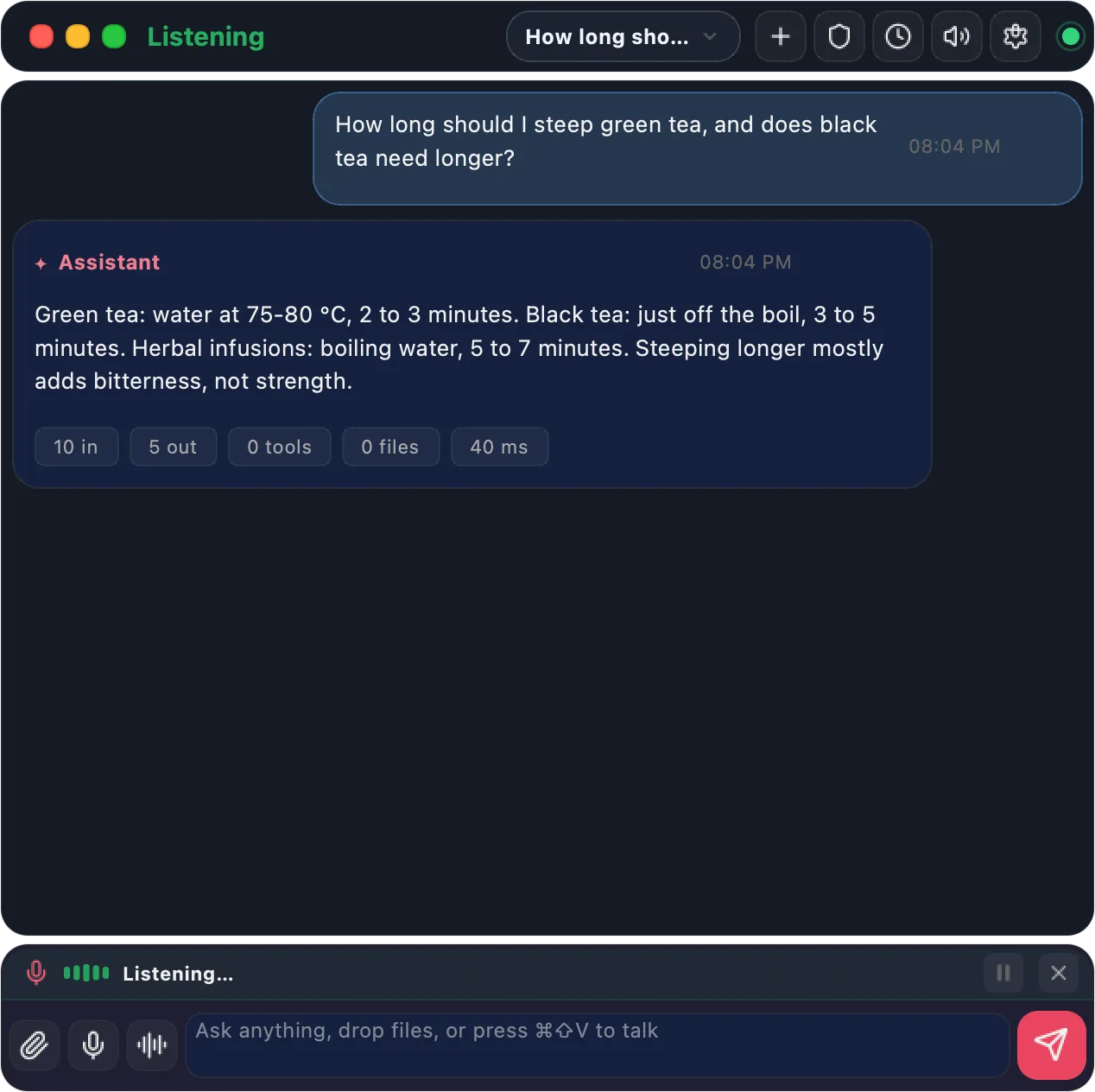
Click its menu-bar or tray icon, or press ⌘⇧Space from any app (Super+Shift+Space on Linux and Windows; configurable), and the palette opens on your gateway: your sessions from every device, your automations and live run activity. In the palette, ⌘⇧V starts a hands-free voice conversation. It is OS-agnostic: the same Python app runs on macOS, Linux and Windows desktops with a system tray. It has been tested most on macOS, where it is also packaged as a menu-bar app bundle.
Music, Images and Video, Locally
Generate on your hardware. On Apple Silicon, MLX-Gen runs FLUX.2, Qwen Image, Z-Image, ERNIE and Wan 2.2; on NVIDIA, Diffusers and stable-diffusion.cpp. Hardware needs are in the creator journey.
Text-to-Music (ACE-Step / ACE Music)
Locally with ACE-Step 1.5, or remotely through the ACE Music API. Instrumental and vocal tracks with genre and style control.
Text-to-Image and Image Editing

/v1/images/generations — "A paper boat on a calm lake at sunrise, watercolor"

Before and After: Image-to-Image and Image-to-Video



Video (Wan 2.2)
Generated on-device with AbstractVision through MLX-Gen. Local video generation runs through MLX-Gen, validated on Apple Silicon first; the local Diffusers text-to-video path is experimental and temporarily disabled. AbstractVision also runs the Wan 2.2 A14B text-to-video and image-to-video models. Decoded in tiles by default, Wan 2.2 TI2V-5B peaks at 16.3 GiB of memory at 832×480 and 25.4 GiB at 1280×704 on Apple silicon: which Mac fits which model.
Text-to-video
Start Anywhere. Continue Everywhere.
Runs live on the gateway, not in the client. The AbstractCode terminal and browser clients share the same sessions, and the Assistant’s Sessions tab lists every chat session on the gateway, whichever client started it. Start a conversation in AbstractAssistant on your MacBook Pro, continue it with the AbstractCode terminal client in an SSH app on your phone, and finish it in the AbstractCode web app in any browser.
- llm_call completed
- tool_calls waiting
- tool_calls completed
- llm_call completed
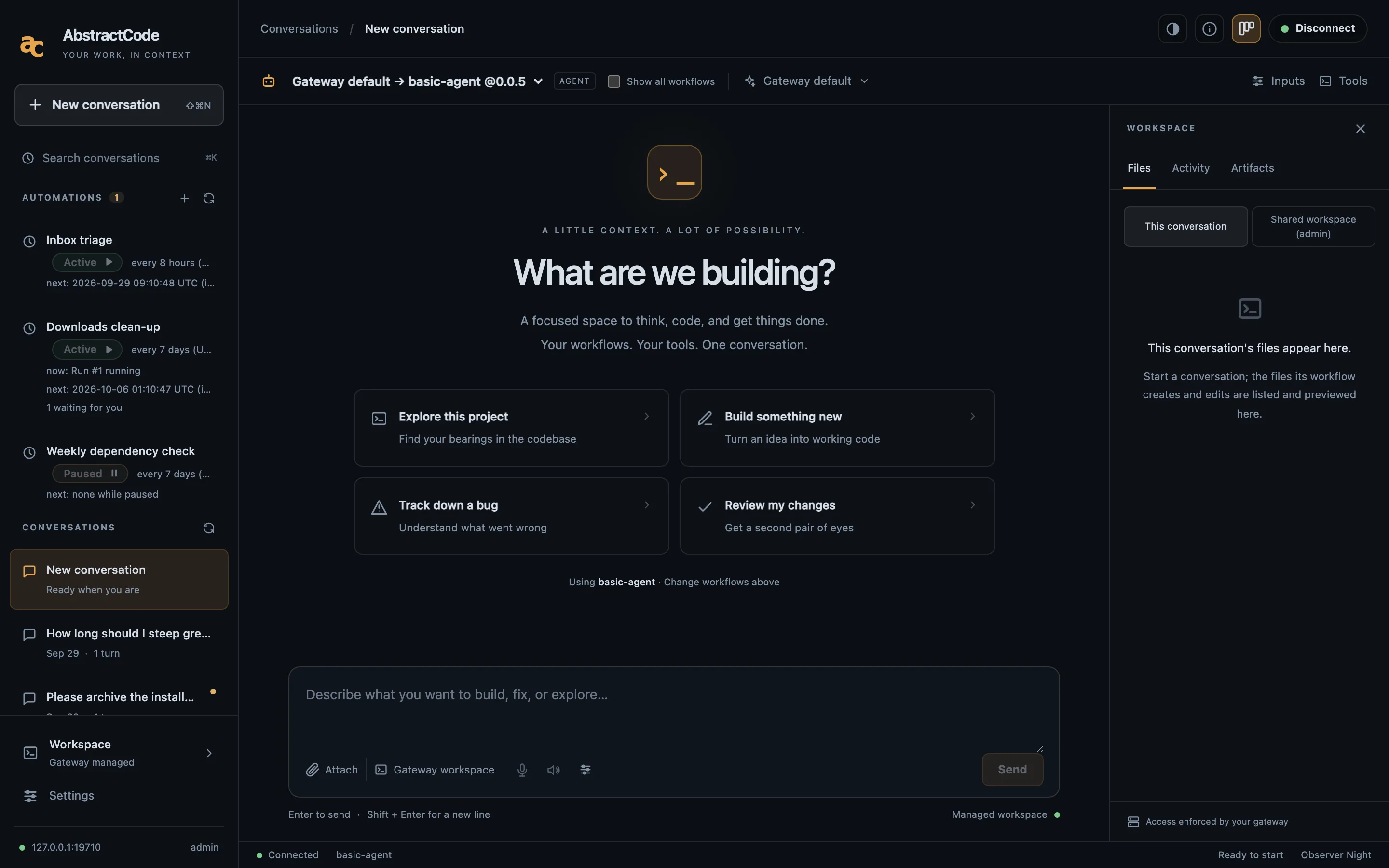
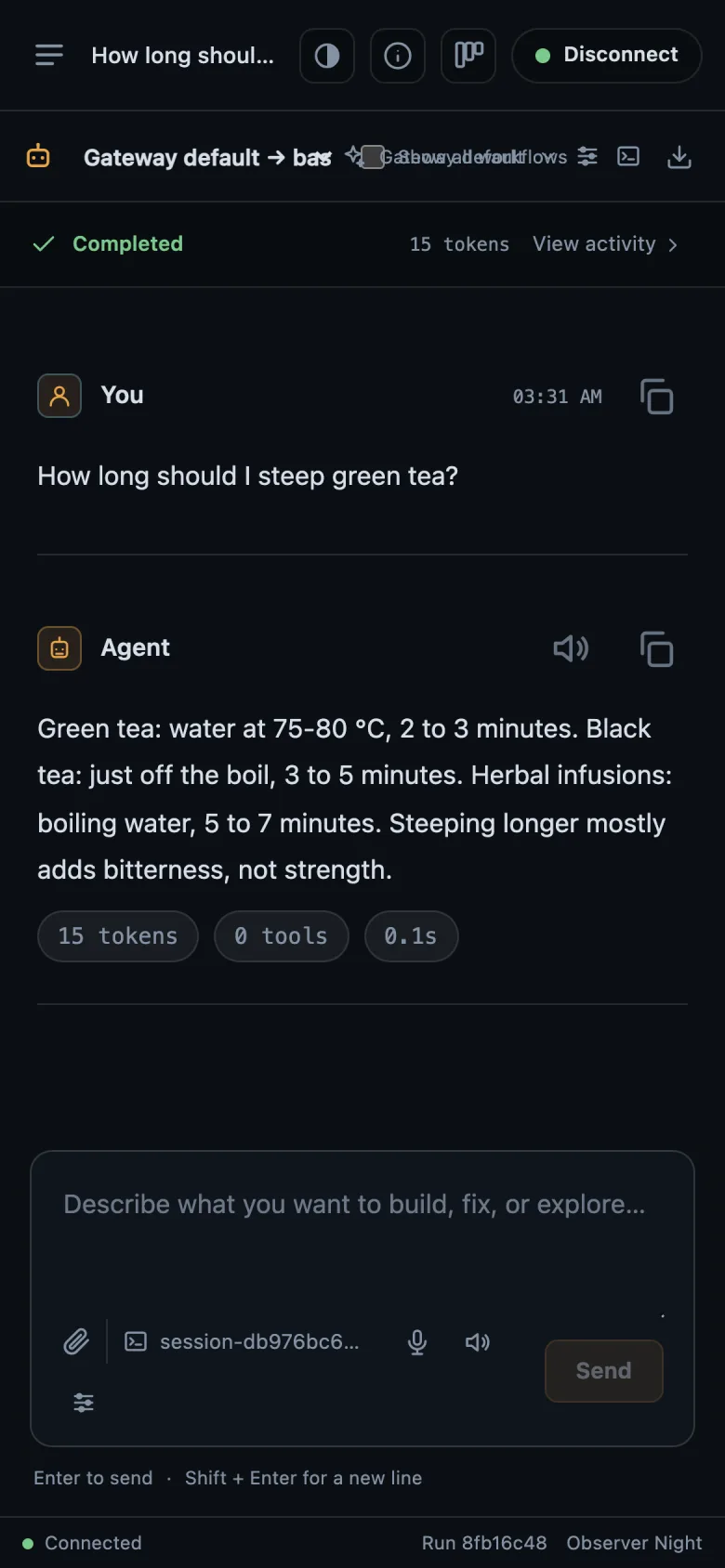
Real screens of each client, captured separately; not one recorded session.
- You, on the MacBook Pro in AbstractAssistant: Summarize the open issues in my project.
- Assistant: Three open issues: two about install on Linux, one about voice.
- You, on the phone in the AbstractCode terminal client over SSH: Draft a reply to the voice issue.
- Assistant: Here is a draft reply for the voice issue.
- You, in the browser in AbstractCode web: What is in my Downloads folder?
- The agent asks to run the tool execute_command with the command ls ~/Downloads. The run waits for your approval, and the request appears in all three clients; nothing else happens until you answer.
- You approve it from the phone. The approval resolves the run's wait, and all three clients see the run continue.
- Tool result: 42 items.
- Assistant: 42 items: 18 installers, 11 archives and 13 documents. Want me to move the installers to the Trash?
Illustration. Every step is appended to the run's ledger; any client that connects replays the run from it and follows it live. A turn sent from AbstractCode runs AbstractCode's agent workflow on the same history. The terminal client signs in to a remote gateway with abstractcode login --gateway-url <url> --token <token>; on the gateway’s own computer, SSH included, abstractgateway apps tui-command code prints a one-use line that opens abstractcode signed in.
Entities: Persistent, Self-Evolving Agents
We call an entity a persistent, self-evolving agent with an identity, a purpose, a history and experiences. AbstractEntity is our work toward self-evolving agents.
An identity, planted once
Values in order of precedence, purposes and traits, from a starting document you give it at creation and kept for life. Every conversation opens with that identity core, whole: a core that does not fit is refused rather than cut.
Expertise it owns
Give an entity a responsibility and it keeps it. Every conversation and task is formed into its memory, and at the end of each session it writes down the lessons and feelings it keeps: what worked, what did not and why.
A history shaped by what it lives
Its history, its interests and its purposes in practice grow from its experiences and from the requests and tasks it receives, in a temporal memory graph where every fact keeps when it was observed, when it held and where it came from. Its diary is hash-chained, with no delete path in the code or over HTTP.
Two tracks
For your work: an agent with a persistent identity and expertise, which you visit, summon into a work session as itself, or give a task, and which remembers how things went.
For research: in its own time an entity explores its interests and tries to resolve its open questions. Whether a self-evolving history like this can lead to something like awareness is an open research question.
- Every visit is a durable run, kept in the entity's home folder
- Sleep consolidates memory without calling a model; it only proposes
- Copy the home folder and you move the whole entity
AbstractEntity 0.3.0 and AbstractMemory 0.3.0 are released and pre-1.0: the APIs are versioned and tested, and details may still evolve.
How an entity remembers is described next.
How an Entity Remembers: Reconstructed, Not Retrieved
Before every answer, an entity's working memory is rebuilt from the moment: who is there, what is asked, and when. Then it can read more on its own. Every reconstruction is kept, in the run's ledger and in the temporal memory graph.
Each moment rebuilds working memory from the cue (the words of the request and who is present): the identity core, what was just in use, and what the request calls up. The entity can then read more with its memory tools. Every reconstruction is kept twice, as a step in the run's ledger and as a trace in the temporal memory graph, and only the memories it actually used grow stronger.
Passive
Each turn is a cue: the words of the request and who is present; at the start of a visit, the date, the time of day and the machine too. It rebuilds a working memory from the core identity, what was just in use, and what the cue calls up through exact, keyword, vector and co-presence channels, with activation spreading along links between memories.
Active
During the turn the entity can ask for more: search and read its memories, list the recent ones, ask how it feels about someone or something, read its diary. These are pure reads over its own memory. AbstractMemory also offers a deliberate reach (probe) and a rebuild of one past moment (situate).
Durable and explainable
Each reconstruction is a step in the run's ledger and a trace in the memory graph. recall_history shows a memory's part in past recalls and explain_recall answers why it did or did not surface. Only memories actually used are strengthened.
Graph Memory & Strong Semantics
Agents need memory. AbstractMemory provides a temporal, provenance-aware knowledge graph. AbstractSemantics is the shared vocabulary; its JSON Schema constrains LLM output to known predicates.

Temporal Triple Store
Every fact is a triple (subject, predicate, object) with the time it was observed, an optional confidence, free-form provenance and a validity window (valid_from / valid_until). The graph remembers when something was true, not just that it was true.
- Append-only with validity windows (
valid_from/valid_until) - Provenance as a free-form record: source, run, span
- Multiple backends: InMemory, SQLite, LanceDB
- Vector search when an embedder is configured
from abstractmemory import InMemoryTripleStore, TripleAssertion, TripleQuery

store = InMemoryTripleStore()
store.add([
    TripleAssertion(
        subject="user",
        predicate="schema:knowsAbout",
        object="Python",
        scope="session",
        confidence=0.95,
        provenance={"source": "conversation"}
    )
])

hits = store.query(TripleQuery(subject="user", limit=10))
print(hits)
Schema-Validated Semantics
AbstractSemantics provides the ontology: allowed predicates, entity types, CURIE prefixes. Use the registry's JSON Schema to constrain LLM output to known predicates.
- YAML registry of predicates and entity types
- JSON Schema builder for LLM structured output
- One vocabulary shared by the framework's packages
- Override via env for custom ontologies
Your First Hour
Six guided starts: what to install, what to click or type, and three things to try.
User
You want a capable assistant on your own computer, with your data staying there.
- Chat with a local model
- Talk to it by voice
- Let it check things for you on a schedule
Artist / creator
You make voices, music, images or video, and want to run the models yourself.
- Clone a voice you have the rights to
- Compose music from a prompt
- Generate images and short videos
Developer
You build with LLMs and want one API across providers, durable runs and a real control plane.
- AbstractCore in three lines of Python
- Start runs through the gateway API
- Draw a workflow in Flow, code with AbstractCode
Architect / solution engineer
You decide where AI runs, who can reach it and where the data lives.
- Local, LAN, internet or headless Linux
- Containers and multi-user auth
- Security posture and data ownership
Researcher
You investigate questions and want agents that search, cite and keep a trace of every step.
- Run deep-research and co-scientist
- Inspect every call in the ledger
- Give agents a lasting memory
Automation owner
You want recurring checks and reports that run on their own and speak up only when needed.
- Your first automation in minutes
- Independent or growing context
- Notifications only when it matters
Why AbstractFramework?
Open Source
MIT licensed. No black boxes, no vendor lock-in. Inspect, modify and extend every line of code.
One Framework, Many Deployments
Local and cloud inference, alone or mixed. The same framework on a laptop, a LAN server, a container or the internet.
Durable by Default
Runs on the gateway survive crashes and restarts and resume where they stopped. The append-only ledger keeps every step.
Observable, Replay-First
Every LLM call, tool call and wait is a ledger record. Any client rebuilds its view of a run by replaying it, then follows it live.
Composable
Use one package or the whole stack. AbstractCore and its modality plugins work on their own; each higher layer builds on the ones below it.
Human in the Loop
Tools wait for your approval, runs wait for your input, and Discuss turns any automation result into a conversation.
Where it comes from
Work on what became AbstractFramework began in early 2024. Its first public form, AbstractLLM, was published on GitHub and PyPI on 8 April 2025. AbstractLLM later became AbstractCore, and the rest of the framework was built as the dedicated packages below, each with its own changelog.
Start With One Line
Open source and MIT licensed. Install the whole framework, or one package from PyPI, npm or crates.io.