AbstractObserver
AbstractObserver is the browser app (also installable as a progressive web app) for the runs of your AbstractGateway. You discover the gateway's workflows, launch runs or turn them into automations, follow each run by replaying and streaming its durable ledger (the record of every step), answer runs that wait for you, and control them with durable commands. The Observer executes nothing itself: every action is a gateway request. The gateway's console installs and opens it from its Apps page (Install).
# Gateway console: Apps > Observer > Open
# (served at /apps/observer/, already signed in)

# Or on its own: http://localhost:3001
npx @abstractframework/observer \
--gateway-url http://127.0.0.1:8080See every run, act on it
The Observer is a browser app plus a small Node server that serves it and signs in to the gateway for it. It renders state from the gateway's durable ledger.
Replay first, then live
The Observer pages through a run's ledger history, then opens a server-sent events stream for new records, so you see the whole run even when you arrive mid-way.
Durable commands
Pause, resume and cancel go to the gateway as durable commands. Questions, tool approvals and events a run waits for are answered in place.
One sign-in dialog
Sign-in is the shared AbstractFramework connection dialog (the same one AbstractFlow and the gateway console use): the gateway URL, a gateway user id and that user's token, exchanged for a gateway session. The token is not kept in the browser.
Served by the gateway
The gateway starts the Observer on 127.0.0.1 and serves it at /apps/observer/ on its own address: one port for the console, the API and the apps, also on a remote server.
Board, Observe, Launch, Automations
All pages share the same gateway connection.
Board
The landing page: kanban columns Pending, Working, Review and Done across every run. Cards move by state, the Review column has inline Approve, Deny and Answer, and an entities strip links to the entity app.
Observe
A workflow and subworkflow navigator, overview, human timeline, raw ledger, provider calls, graph, digest and attachments, and Ask about the run, with optional voice (push-to-talk and text-to-speech through the gateway).
Launch
Run once, or Automate: what to run, when (UTC intervals, or once at a time), independent or growing context, and tool approval. Workflow bundle upload and reload live here too.
System
Activity, Artifacts, Memory and Logs: runtime state across runs, an artifact explorer with inline media previews, knowledge-graph queries and the gateway's audit tail.
Docs assistant
Assistant in the top bar answers questions about the Observer itself from its documentation, one gateway session per conversation, with no tools.
Settings and About
Connection status, theme and display preferences, and the versions of the Observer and of the connected gateway.
Workflows that run for you
"Search the AI news every 8 hours", "check the machine every 7 days". Create one with Launch → Automate (or + New automation), then watch and change it on the Automations page. The gateway runs it and keeps every run. See Automations.
| Control | What it does |
|---|---|
| Pause / Resume | Pause stops scheduled runs until you resume; a run in progress finishes, and Run now still works. Resume restarts the schedule at its next time after now; times missed while paused are skipped. |
| Run now | Runs it once now instead of waiting for the schedule. The next scheduled run keeps its time (or starts right after this run if its time comes first), the run does not count toward a run limit, and it works while paused (the automation stays paused). Not available while a run is in progress. |
| Stop current | Cancels the run in progress, or its pending retry. It ends as cancelled, with no failure notice, and the schedule continues. |
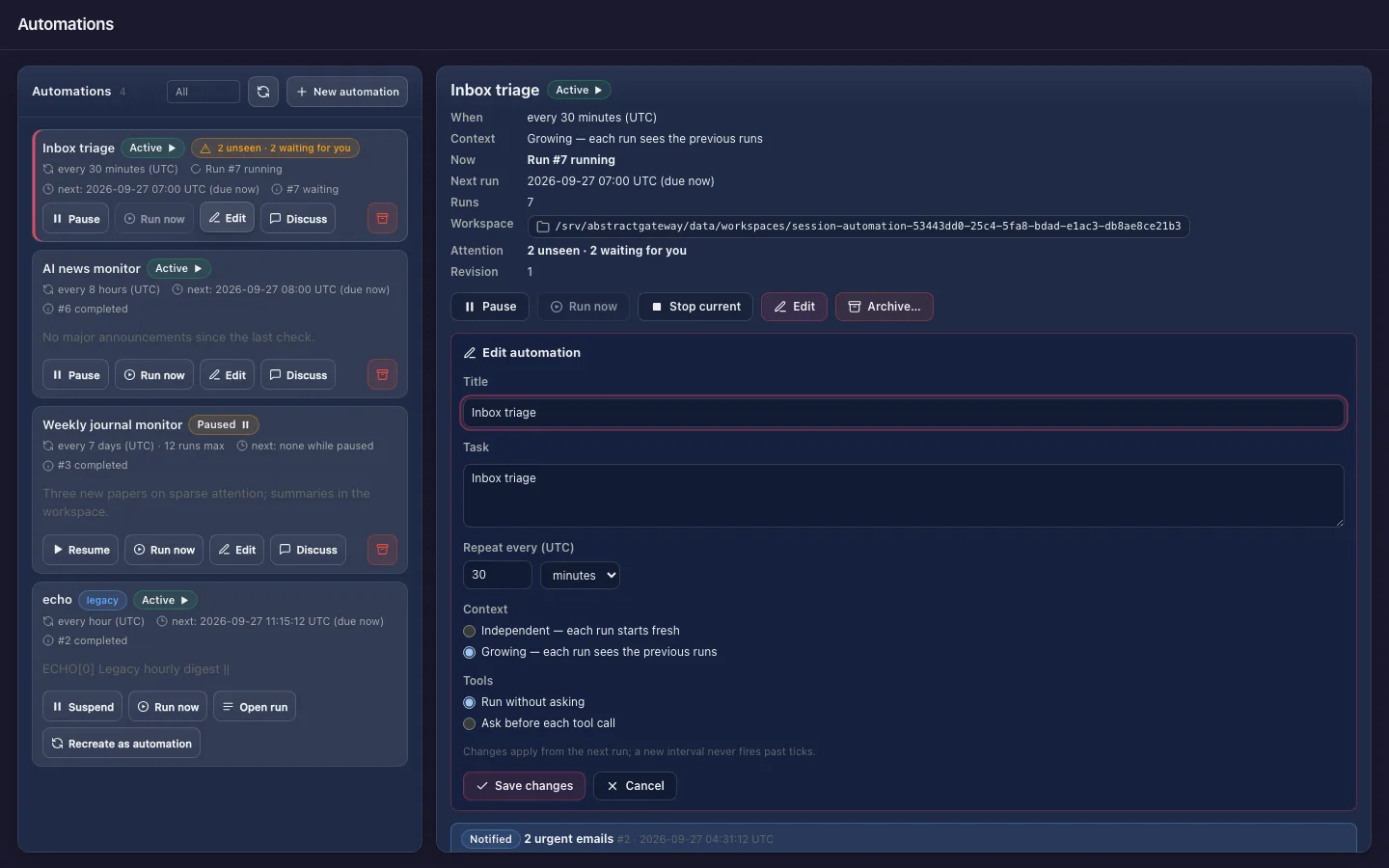
| Edit | Opens the Edit form, prefilled: title, task, interval, context and tools. Save applies from the next run. |
| Discuss | Opens a chat with a fork of the automation at a finished run: its history in context, its own workspace, the automation's files read-only. |
| Archive | Stops the automation for good, after a confirmation. A run in progress finishes, and the history stays readable. |
Independent or growing
Independent (the default): each run starts fresh. Growing: each run is a new turn of one conversation and sees the previous runs, bounded to the most recent 50,000 tokens of whole turns.
Runs as a conversation
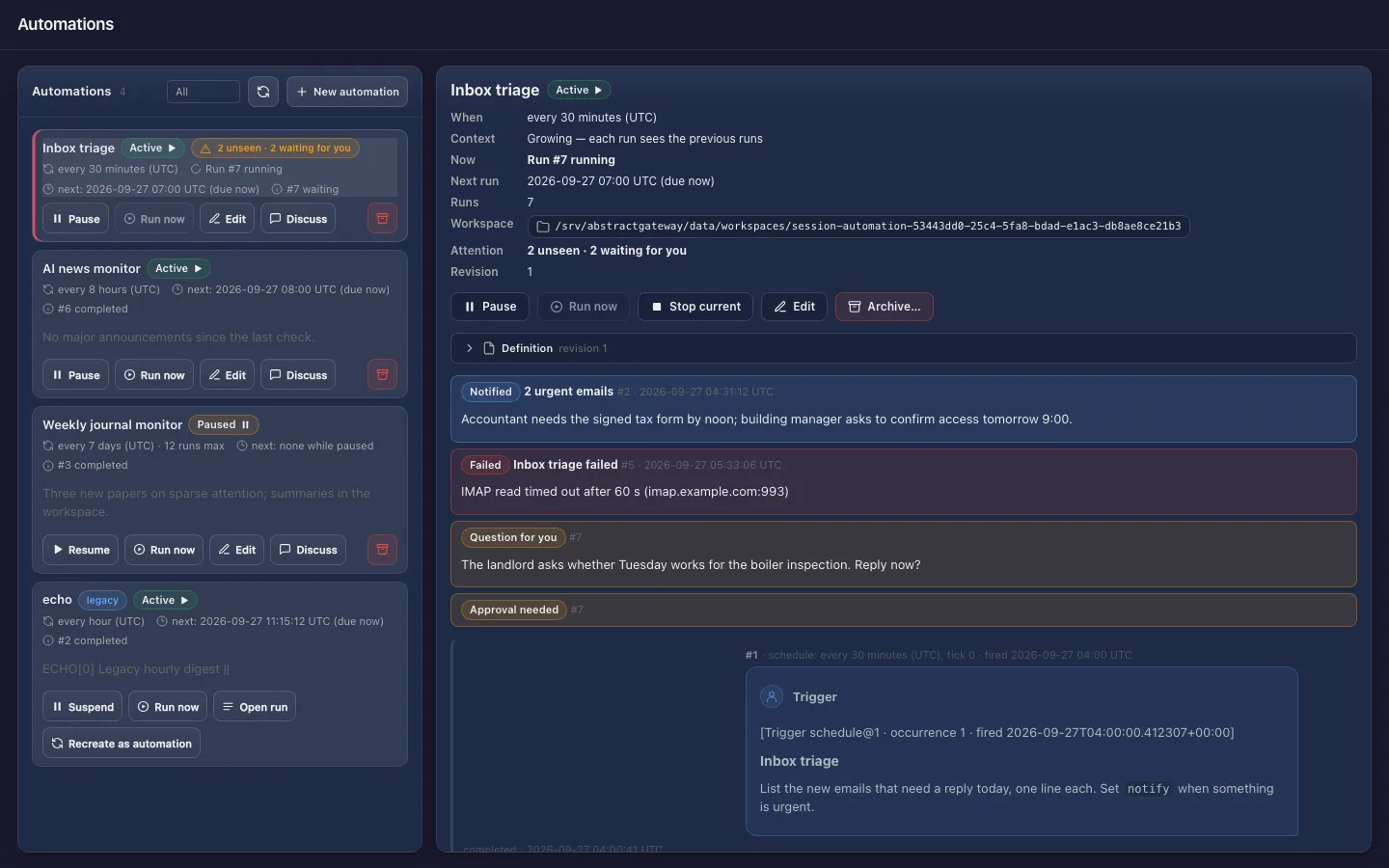
Each run shows as a chat pair: what triggered it and the instruction it received, then its answer, notification, failure or files. Runs stay quiet unless they need you, and a Needs attention section lists what you have not seen.
Its files, from any browser
The folder button next to Workspace browses the automation's folder on the gateway host, and opens or downloads each file through the gateway. A discussion has Its files and Automation files.
The Automations page
AbstractObserver with demo automations: the list with each automation's interval, state and last result, an opened automation with its runs, and the Edit form.
Open the Observer
You need a running AbstractGateway (abstractgateway serve, or the installer). Running it on its own needs Node.js 18 or newer.
# Gateway console: Apps > Observer > Install, then Open
# or from a terminal:
abstractgateway apps install observer --launch
abstractgateway apps open observer     # a one-time signed-in link

# The Observer is at <gateway address>/apps/observer/
npx @abstractframework/observer --gateway-url http://127.0.0.1:8080
# or install the command
npm install -g @abstractframework/observer
abstractobserver --gateway-url http://127.0.0.1:8080
# open http://localhost:3001 and sign in with a gateway user id and token| Flag | Meaning |
|---|---|
--gateway-url <url> | The gateway this server signs in to and proxies /api to (aliases --gateway, --url). Default: the gateway installed on this computer (~/.abstractframework/gateway.json, followed when it moves port), else http://127.0.0.1:8080. |
--port <n> | The port to listen on (default 3001). |
--host <addr> | The address to listen on (default 127.0.0.1). Pass 0.0.0.0 only to reach it directly from other machines, or open it through the gateway. |
--monitor-gpu | Shows the optional GPU widget. |
--entity-app-url <url> | Where the entity app lives, for the "Entities" links (default http://127.0.0.1:3007). |
--gateway-dir <dir> | The base for relative run workspace paths. |
Pin a version for deployments with npx --yes --package @abstractframework/observer@0.2.1 -- abstractobserver. abstractobserver --help lists the flags. The PORT, HOST and ABSTRACTOBSERVER_* environment variables are also read; a flag takes precedence over them.