Start as an architect
Decide where AI runs, who can reach it and where the data lives. AbstractGateway is one process per data folder: a durable control plane with user accounts, a replayable ledger and thin clients over HTTP and SSE.
Install, try it, make it yours
Read the shape of the system 10 min
Clients (the gateway consoles, browser apps, the Assistant, AbstractCode, your own app) talk to AbstractGateway over HTTP and SSE. The gateway runs workflows on AbstractRuntime, which records every step in an append-only ledger, and reaches models through AbstractCore: local engines on the gateway host or cloud providers.
Consoles / browser apps / AbstractAssistant / AbstractCode / your app
  -> AbstractGateway (HTTP + SSE) -> AbstractRuntime -> AbstractCore -> Providers
Choose a topology 15 min
Who can reach it
This computer
The default: the gateway listens on 127.0.0.1 only, with user accounts on. Nobody else can connect.
localhostDefaultLocal network (LAN)
Every device on your network (or your VPN) reaches the sign-in page and the API. User accounts are required. It is plain HTTP, so use it on networks you trust, or behind a TLS proxy or VPN.
lanAccounts requiredInternet
The same, with an explicit acknowledgement. The gateway does not terminate TLS: put your own TLS reverse proxy (Caddy, nginx, Traefik) or a tunnel in front of it.
internetYour TLSHow it runs
Desktop
An icon in the macOS menu bar, the Windows system tray or a Linux panel opens the console already signed in. Start AbstractGateway at login registers a per-user login item.
Headless server
Install over SSH with the same one-line installer, manage it from the terminal console (abstractgateway-console), keep it running with a systemd --user service, and reach the console, the API and every app through one SSH tunnel.
systemd --userContainer
Release images on GHCR (ghcr.io/lpalbou/abstractgateway, and a -gpu variant), run with a mounted data directory and ABSTRACTGATEWAY_USER_AUTH=1.
In practice. A new gateway answers on this computer only. The Network setting, in the web console, the terminal console or the tray, or abstractgateway network set lan (or internet) opens it up at the next start, and both keep user accounts on. A gateway started on another address without user accounts or a token refuses to start.
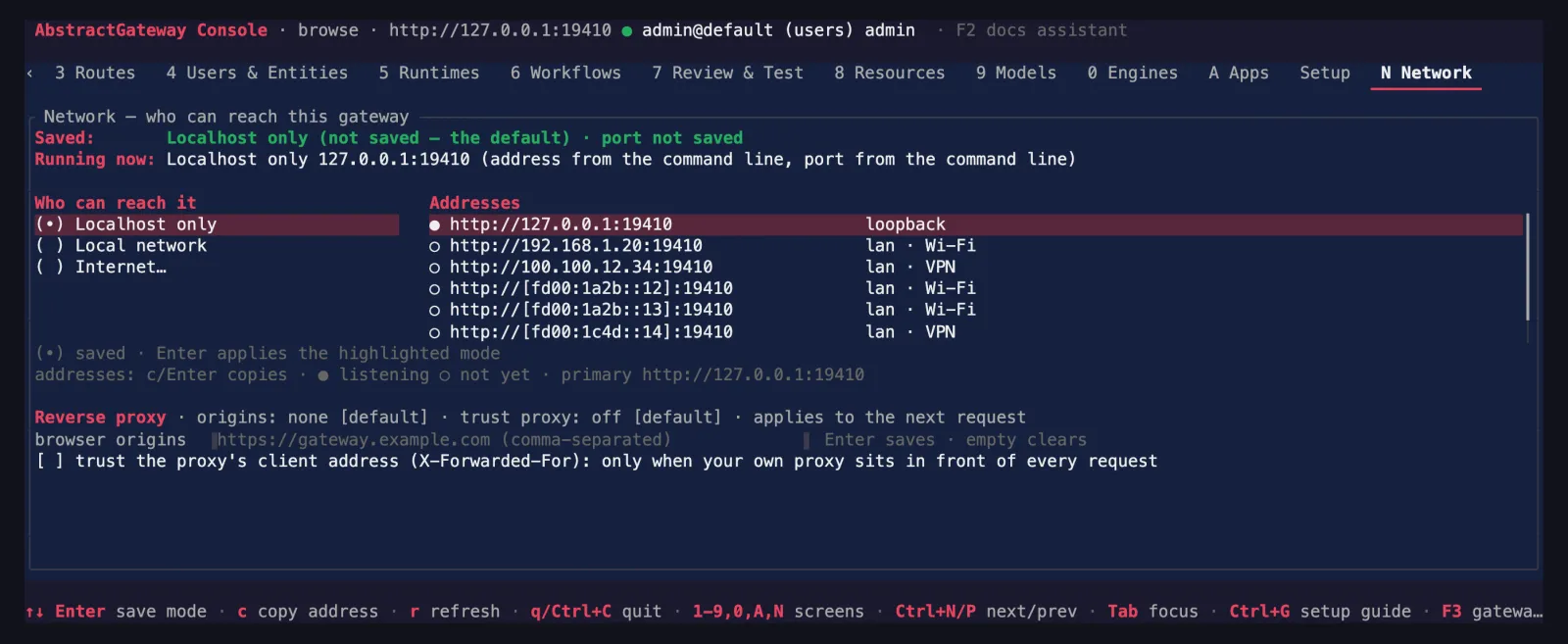
N) shows the saved mode, what is running and every address.Stand up a server 15 min
docker run \
  -p 8080:8080 \
  -v "$PWD/runtime:/data" \
  -e ABSTRACTGATEWAY_DATA_DIR=/data \
  -e ABSTRACTGATEWAY_USER_AUTH=1 \
  ghcr.io/lpalbou/abstractgateway:0.7.2
On first start it creates default/admin and writes the login token to runtime/auth/bootstrap-admin-token. Create named users in the console’s Users & Entities tab and rotate the bootstrap token.
Place the data 10 min
Everything a gateway owns lives in its data folder: settings, users, chats, run history and ledgers, artifacts and memory. The default is ~/Library/Application Support/AbstractGateway on macOS and ~/.local/share/abstractgateway on Linux; choose another with --data-dir. Model weights live in the engines’ caches (for example ~/.cache/huggingface). Run one gateway process per data folder.
Check it 10 min
uvx abstractframework doctor
abstractgateway network status
abstractgateway network addresses
doctor only reads: Python, uv, Node, disk, the gateway, and whether Ollama and LM Studio answer.
Then make it yours
A team gateway on your LAN
Switch to lan, create one user per person, and let each open the apps from their own browser: one user, one runtime, their own sessions and workflow catalog.
A remote GPU box
Install on a Linux GPU server with the gpu profile, configure it from the terminal console, and reach it through one SSH tunnel from your laptop.
Audit a run
Open any run in the Observer and replay its ledger step by step: every prompt, tool call, wait and answer, with timings.
Closed by default, opened on purpose
Loopback first
A bare abstractgateway serve binds 127.0.0.1:8080. A non-loopback --host without auth refuses to start, and lan is refused unless user auth is on.
Users and sessions
User auth is on by default: one user, one runtime. Tokens are shown once and stored hashed; browser apps use an HTTP-only session cookie with a CSRF token, and repeated failed sign-ins lock out.
One-time sign-in links
Claim links last 10 minutes, are redeemed only from this machine, and requests carrying proxy headers are refused. Terminal clients take the admin token directly with --token.
Browser protections
Origins are limited to localhost and the gateway's own LAN origins unless you allow an exact origin. The apps and the app proxy refuse DNS-rebinding hosts and foreign origins.
Protected folders
Every run is denied the credential folders (~/.ssh, ~/.aws, ~/.gnupg, ~/.config/gcloud, ~/.kube, ~/Library/Keychains) and the gateway's own data folder.
Server-held keys
Provider keys are write-only in the console. AbstractCore spends a server-held key only for authenticated requests.